Service Worker · Concept
Service worker lifecycle
Published
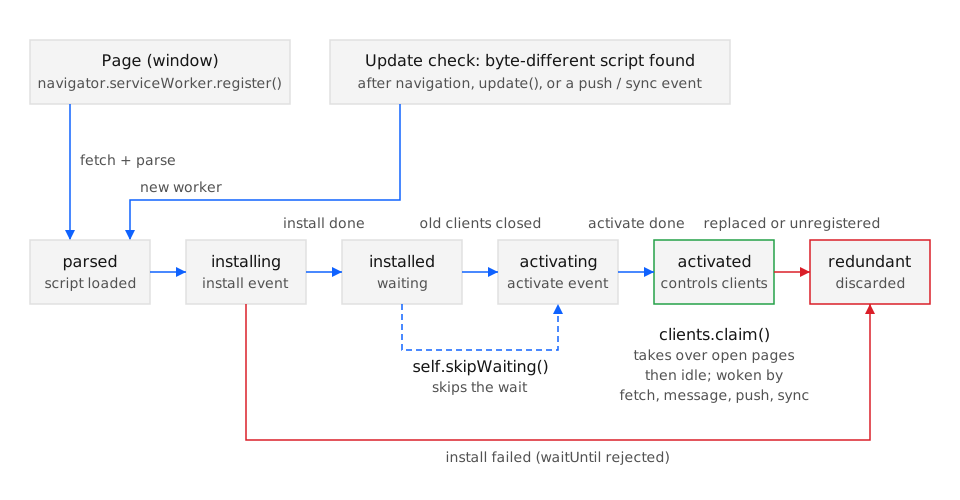
A service worker moves through a fixed sequence of states, installing → installed → activating → activated, before it handles any fetch event, and a newer version installs beside the old one but stays installed (waiting) until every tab controlled by the old worker is gone. The state machine is identical in Chrome 40, Firefox 44, Safari 11.1, and Edge 17 (BCD api.ServiceWorker.state); what differs between browsers is only the tooling for inspecting it.
How it works
Section titled “How it works”navigator.serviceWorker.register(scriptURL) fetches and parses the script. If parsing succeeds the browser creates a ServiceWorker object in state installing, fires updatefound on the ServiceWorkerRegistration, and exposes the worker as registration.installing. Each later transition fires statechange on that ServiceWorker object, so a page can follow the whole sequence from one listener.
| State | Event in the worker | What the browser does |
|---|---|---|
installing |
install |
Runs the handler; event.waitUntil(promise) holds the state until the promise settles. A rejection makes the worker redundant and leaves the previous version in place. |
installed |
none | The worker is registration.waiting. If no other worker controls clients it moves on at once; otherwise it waits until the last controlled client closes or the worker calls self.skipWaiting(). |
activating |
activate |
Runs the handler, again held by waitUntil(). Old caches are deleted here because the previous worker can no longer run. |
activated |
fetch, message, push, sync… |
The worker is registration.active and controls new navigations in scope. Already-open pages keep their previous controller unless the worker calls self.clients.claim(), which fires controllerchange on navigator.serviceWorker in each affected page. |
redundant |
none | Install failed, or a newer worker took over. The object stays reachable until the page drops it. |
Two rules make the sequence safe for updates. The waiting rule guarantees that a page and the worker serving it come from the same deployment: a tab still running old HTML is not handed to a worker with different cache names. The idle rule means a worker is not a long-lived process: between events the browser terminates it (Chrome after about 30 seconds of inactivity, per web.dev’s lifecycle article) and restarts it for the next event, so anything that must survive goes in Cache Storage or IndexedDB, not in a global variable.
The update check that starts a new cycle runs on every navigation into scope, on registration.update(), and on push and sync events, and compares the fetched script byte for byte with the installed one. A one-byte difference starts a new installing worker; an identical script does nothing. The browser honours HTTP caching for the script only up to 24 hours (the registration option updateViaCache controls whether imported scripts and the main script may come from the HTTP cache at all).
Examples
Section titled “Examples”The first example instruments every transition so the sequence can be read in the page console; the second decides an update policy and degrades cleanly where the API is absent.
Logging every state transition from the page
Section titled “Logging every state transition from the page”updatefound fires once per new worker; statechange fires on each transition of that worker; controllerchange fires when the page’s controller swaps. Together they reproduce the table above at runtime.
const registration = await navigator.serviceWorker.register('/sw.js');
registration.addEventListener('updatefound', () => {  const worker = registration.installing;  console.log('new worker:', worker.state);          // "installing"  worker.addEventListener('statechange', () => {    console.log('state ->', worker.state);          // installed, activating, activated | redundant  });});
navigator.serviceWorker.addEventListener('controllerchange', () => {  console.log('controller is now', navigator.serviceWorker.controller?.scriptURL);});
On the first visit controllerchange does not fire unless the worker calls clients.claim(): the page was loaded without a controller and keeps it that way until the next navigation. A reload after the first activation shows navigator.serviceWorker.controller populated from the start.
Choosing an update policy with a fallback for browsers without the API
Section titled “Choosing an update policy with a fallback for browsers without the API”The default waiting behaviour is the safe policy and needs no code. The code below opts into an immediate takeover only when the page is prepared to reload, and when serviceWorker is absent (insecure origin, or a browser with the API disabled) it leaves the app in its online-only mode instead of throwing.
if (!('serviceWorker' in navigator)) {  document.documentElement.dataset.offline = 'unsupported'; // online-only UI; no update prompt} else {  navigator.serviceWorker.register('/sw.js').then((registration) => {    registration.addEventListener('updatefound', () => {      registration.installing.addEventListener('statechange', (e) => {        if (e.target.state === 'installed' && navigator.serviceWorker.controller) {          showReloadBanner(() => registration.waiting.postMessage('SKIP_WAITING'));        }      });    });  });  let reloading = false;  navigator.serviceWorker.addEventListener('controllerchange', () => {    if (!reloading) { reloading = true; location.reload(); }  });}
// sw.jsself.addEventListener('message', (event) => {  if (event.data === 'SKIP_WAITING') self.skipWaiting();});
The cost of the immediate policy is one forced reload per update and the obligation to keep the controllerchange guard, otherwise a second controllerchange (for example from clients.claim()) reloads the page a second time. The cost of the default policy is that users who keep the last tab open stay on the old version until they close it.
See also
Section titled “See also”- Service Workers specification: Service worker lifetime (w3c.github.io)
- The service worker lifecycle (web.dev)
- skipWaiting() and the update flow
- Service worker registration and scope
- Debugging service workers
- Clients API
Specifications
| Specification | Status |
|---|---|
| Service Workers | W3C draft |
- Legend
- Yes
- Partial
- Flag
- No
- Unknown
| Browser / Platform | Support | Versions | Confidence | Source | Notes |
|---|---|---|---|---|---|
| Chrome (Android) | Yes | 40 | medium | source | — |
| Chrome (Desktop) | Yes | 40 | medium | source | — |
| Edge (Desktop) | Yes | 17 | medium | source | — |
| Safari (iOS) | Yes | 11.3 | medium | source | 1 |
| Safari (macOS) | Yes | 11.1 | medium | source | — |
| Firefox (Desktop) | Yes | 44 | medium | source | — |
| Samsung Internet | Yes | 4.0 | medium | source | — |
- Storage may be evicted after prolonged non-use.