Notifications · Concept
Periodic background sync for content updates
Published Updated
Periodic background sync lets an installed PWA refresh its cached content on a schedule the
browser chooses, by firing a periodicsync event in the service worker while no page is open.
It exists so that a news or weather app opens with current data instead of a spinner, and it is
Chromium-only, gated on installation and on how often the user actually opens the app.
How it works
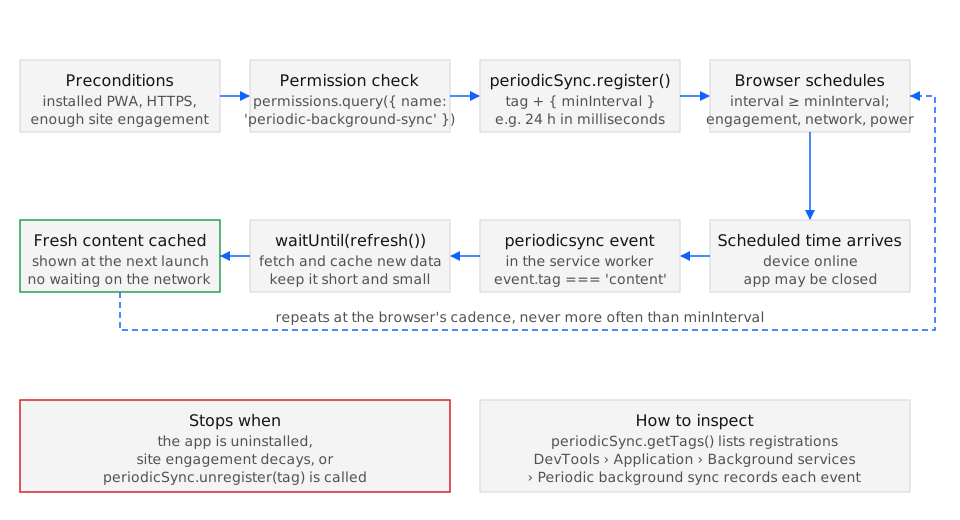
Section titled “How it works”The page registers a tag with registration.periodicSync.register(tag, { minInterval }); the
browser then fires periodicsync in the service worker no more often than minInterval, when
the device is online, and only for as long as it judges the app worth waking. The API surface
(PeriodicSyncManager, register(), getTags(), unregister(), the periodicsync event) is in
Chrome 80 and Edge 80 and nowhere else (BCD api.PeriodicSyncManager); the method-level reference
is the service worker entry.
Chrome’s gates
Section titled “Chrome’s gates”Chrome fires the event only for a web app the user has installed and launched as a standalone
app, not for a site in a tab, and only when the device is on a network it has used before
(Periodic background sync,
developer.chrome.com). The frequency is tied to the site engagement score Chrome keeps per origin,
visible at about://site-engagement/: a score of zero means no events at all, and a higher score
allows syncs closer to minInterval. If the user stops opening the app, the score decays and
the events stop. minInterval is therefore a floor rather than a schedule, and a registration with
minInterval: 0 leaves the cadence entirely to Chrome.
Permission
Section titled “Permission”The feature is gated by the periodic-background-sync permission, which Chrome grants
automatically to installed apps without a prompt. navigator.permissions.query({ name: 'periodic-background-sync' }) reports granted or denied from a window or a service worker,
and register() rejects with NotAllowedError when it is denied, InvalidStateError when the
registration has no active worker, and InvalidAccessError when called from a window that is not
a top-level browsing context (PeriodicSyncManager: register(),
developer.mozilla.org).
What it is for, and what it is not
Section titled “What it is for, and what it is not”Background sync, despite the similar name, retries a failed request once connectivity returns;
periodic background sync pulls fresh data on a cadence. Web Push also wakes the worker but
interrupts the user with a notification and must do so under userVisibleOnly. Periodic sync is
the only quiet, repeating option, which makes it right for a daily article cache and wrong for
anything that must happen at a particular time; for that there is no shipped API, as the
notification triggers entry explains.
Examples
Section titled “Examples”Both examples keep the page-load refresh as the fallback and let the API remove it where it works.
Registering a daily article refresh when the app can
Section titled “Registering a daily article refresh when the app can”Register after the service worker is active and the permission is granted. The catch covers
the tab case in Chrome and every other engine, where the code falls back to refreshing on load.
async function enableDailyRefresh() { const registration = await navigator.serviceWorker.ready; if (!('periodicSync' in registration)) { return refreshOnLoad(); // Firefox, Safari, or an uninstalled Chrome tab } const status = await navigator.permissions.query({ name: 'periodic-background-sync' }); if (status.state !== 'granted') return refreshOnLoad(); try { await registration.periodicSync.register('update-articles', { minInterval: 24 * 60 * 60 * 1000 }); } catch { refreshOnLoad(); // permission denied or no active worker: behave as before }}refreshOnLoad() is the pre-existing behaviour, so an engine without the API loses nothing; the
API removes the spinner where it is available.
Handling the event and skipping the load-time refresh
Section titled “Handling the event and skipping the load-time refresh”The worker caches the response inside event.waitUntil(); the page checks getTags() and skips
its own refresh when the sync is registered, because the cache is already fresh.
// service workerself.addEventListener('periodicsync', (event) => {  if (event.tag === 'update-articles') {    event.waitUntil(caches.open('articles').then((cache) => cache.add('/api/articles')));  }});
// pageasync function maybeRefresh(registration) {  const tags = 'periodicSync' in registration ? await registration.periodicSync.getTags() : [];  if (!tags.includes('update-articles')) refreshOnLoad();}
Keep the handler small: Chrome gives the worker a limited window, and a sync that downloads megabytes on a metered connection is the behaviour that lowers the engagement budget.
See also
Section titled “See also”- Web Periodic Background Synchronization (wicg.github.io)
- Periodic background sync (developer.chrome.com)
- PeriodicSyncManager.register()
- Background sync
- Web Push and PushManager.subscribe()
- Notification triggers (showTrigger)
Specifications
| Specification | Status |
|---|---|
| Periodic Background Sync | WICG draft |
- Legend
- Yes
- Partial
- Flag
- No
- Unknown
| Browser / Platform | Support | Versions | Confidence | Source | Notes |
|---|---|---|---|---|---|
| Chrome (Desktop) | Yes | 80 | high | source | — |
| Chrome (Android) | Yes | 80 | high | source | 1 |
| Edge (Desktop) | Yes | 80 | high | source | 2 |
| Firefox (Desktop) | No | — | high | source | 3 |
| Firefox (Android) | No | — | high | source | 45 |
| Safari (macOS) | No | — | high | source | 6 |
| Safari (iOS) | No | — | high | source | 78 |
| Samsung Internet | Yes | 13.0 | high | source | 9 |
| WebView (Android) | No | — | high | source | 10 |
- Derived by browser-compat-data mirroring from Chrome.
- Derived by browser-compat-data mirroring from Chrome.
- No Firefox support is recorded in browser-compat-data.
- No Firefox for Android support is recorded in browser-compat-data.
- Derived by browser-compat-data mirroring from Firefox.
- No Safari support is recorded in browser-compat-data.
- No Safari on iOS support is recorded in browser-compat-data.
- Derived by browser-compat-data mirroring from Safari.
- Derived by browser-compat-data mirroring from Chrome Android.
- Implementation tracking: https://crbug.com/40151529.