beforeinstallprompt and custom install prompts
Published Updated
In one line: Chromium browsers fire beforeinstallprompt when your PWA meets the
installability criteria; you preventDefault() to suppress the mini-infobar, stash the
event, and later call prompt() from a user gesture to show the install dialog. Safari
fires no such event — iOS users install via a manual Add to Home Screen.
How the event flow works
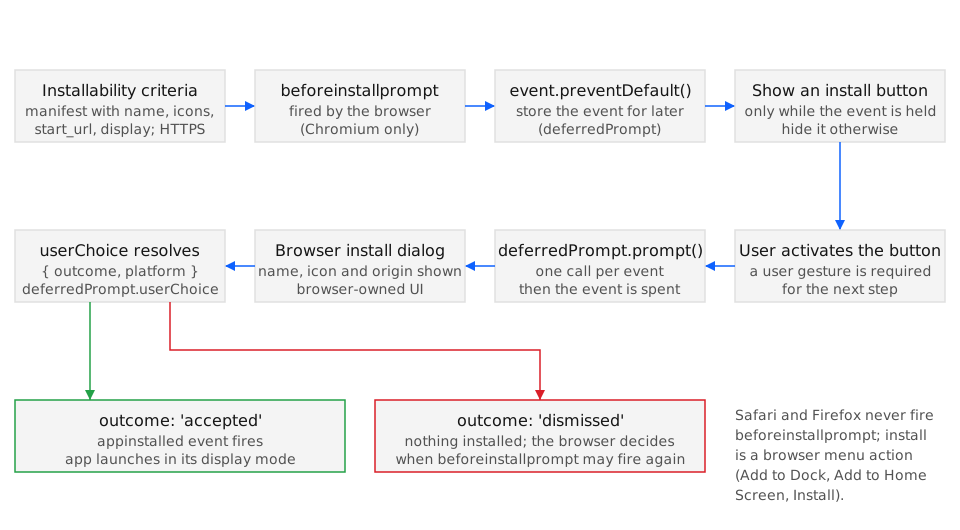
Section titled “How the event flow works”beforeinstallpromptfires once the page is installable. CallpreventDefault()to stop the browser’s default mini-infobar, then save the event reference.- Trigger from a gesture. Browsers only honor
prompt()inside a user-activation context (a click/tap handler). Calling it on page load is ignored. - Read the outcome.
await deferredPrompt.userChoiceresolves to{ outcome: 'accepted' | 'dismissed' }. The saved event can be used only once. appinstalledfires after a successful install (from your prompt or the browser’s own UI). Use it to hide your install button and log the conversion.
let deferredPrompt = null;
window.addEventListener('beforeinstallprompt', (e) => {  e.preventDefault();  deferredPrompt = e;  installButton.hidden = false;});
installButton.addEventListener('click', async () => {  if (!deferredPrompt) return;  deferredPrompt.prompt();  const { outcome } = await deferredPrompt.userChoice;  deferredPrompt = null;  installButton.hidden = true;});
window.addEventListener('appinstalled', () => {  installButton.hidden = true;});
Installability criteria
Section titled “Installability criteria”For beforeinstallprompt to fire, the page must serve over HTTPS (localhost
excepted) and link a web app manifest that declares at minimum a name (or
short_name), a start_url, a display value other than browser, and icons
including a 192px and a 512px PNG. A registered service worker is no longer a hard
requirement in Chrome: per the Chrome team’s “Changes to the installability criteria”,
the requirement for a service worker with a fetch() handler was removed for
installation from the browser menu in Chrome 108 on Android and Chrome 112 on desktop,
with Chrome supplying a default offline page for sites that do not implement one. The
same post notes that the algorithm behind beforeinstallprompt still looked for a
fetch() handler at the time, so a site without a service worker may be installable
from the menu yet never receive the event. Miss a manifest requirement and no event fires.
Browser & ecosystem support
Section titled “Browser & ecosystem support”- Legend
- Yes
- Partial
- Flag
- No
- Unknown
| Browser / Platform | Support | Versions | Confidence | Source | Notes |
|---|---|---|---|---|---|
| Chrome (Android) | Yes | 68 | medium | source | — |
| Chrome (Desktop) | Yes | 73 | medium | source | — |
| Edge (Desktop) | Yes | 79 | medium | source | — |
| Safari (iOS) | No | — | medium | source | 1 |
| Safari (macOS) | No | — | medium | source | 2 |
| Firefox (Desktop) | No | — | medium | source | 3 |
| Samsung Internet | Yes | 9.0 | medium | source | — |
- No beforeinstallprompt; install is manual via the Share sheet → Add to Home Screen.
- Install is via the File → Add to Dock menu, not the web event.
- No manifest-based desktop install path.
How iOS and Safari differ
Section titled “How iOS and Safari differ”- No
beforeinstallprompt. Safari (iOS and macOS) never fires the event and exposes no programmatic install API, so a custom in-page button cannot trigger installation. - Manual Add to Home Screen. iOS users tap Share, then “Add to Home Screen”. You can only guide them with instructions and a visual hint pointing at the Share icon.
- Detect standalone mode with
navigator.standalone(iOS) orwindow.matchMedia('(display-mode: standalone)')to avoid prompting already-installed users.
When to surface a custom install button
Section titled “When to surface a custom install button”| Situation | Recommended action | Rationale |
|---|---|---|
beforeinstallprompt has fired and saved |
Show a discreet install affordance, not a blocking modal | The browser confirmed installability; respect user flow |
| User just landed, no engagement yet | Wait — don’t prompt on first paint | Cold prompts are dismissed and may burn your one chance |
| User completed a meaningful action | Surface the install button now | Intent is high; conversion is far more likely |
| Already installed (standalone) | Hide all install UI | Prompting an installed app is confusing noise |
| iOS / Safari | Show manual Add to Home Screen instructions | No programmatic prompt exists; instruct instead |
Try it
Section titled “Try it”The companion demo at /demo/#install captures beforeinstallprompt, reports the current display-mode, calls getInstalledRelatedApps() where it exists, and triggers the deferred prompt from a button. On iOS and Safari, where the event never fires, it shows the Add to Home Screen steps instead.
Practical checklist
Section titled “Practical checklist”- Verify HTTPS, a linked manifest, 192px + 512px icons, and a registered service worker.
- Call
e.preventDefault()inbeforeinstallpromptand stash the event. - Only call
prompt()from inside a click/tap handler (user gesture). - Treat the deferred event as single-use; clear it after
userChoiceresolves. - Listen for
appinstalledto hide your button and record the conversion. - Detect standalone mode and suppress install UI for already-installed users.
- Provide an iOS/Safari fallback with explicit Add to Home Screen guidance.