Manifest · Manifest member
share_target manifest member
Published
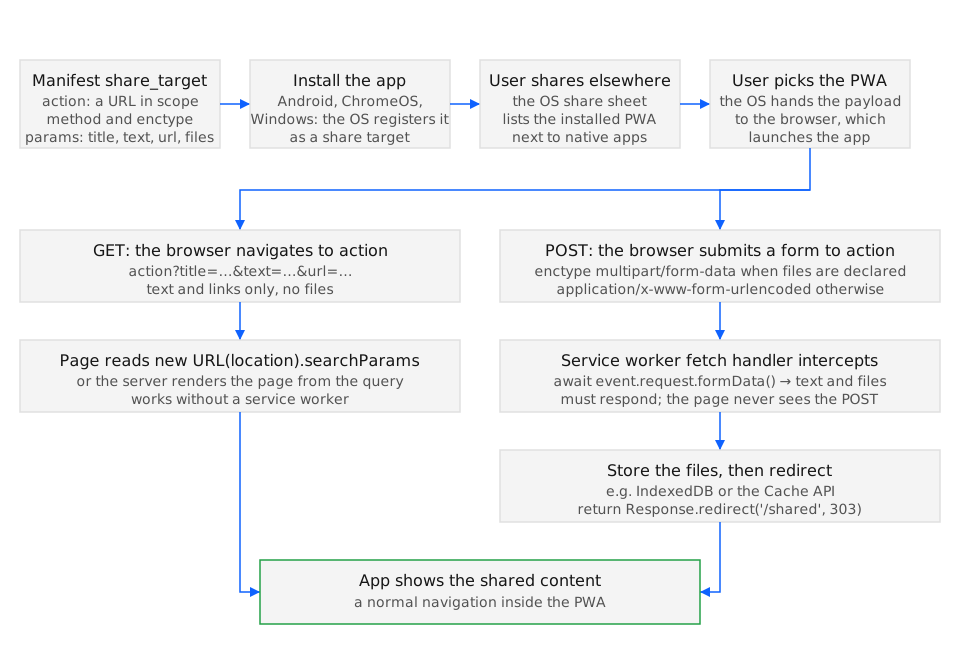
share_target registers an installed web app as a destination in the operating system’s share
sheet. When the user picks the app, the browser delivers the shared title, text, URL, and files to
a URL inside the app’s scope, either as query parameters on a GET navigation or as a
multipart/form-data POST that a service worker can intercept.
Chrome 76 on Android, Edge 89 on desktop (GET, with limited file support), and Samsung Internet
12.0 read the member (BCD html.manifest.share_target). Safari 27 on iOS and macOS and Firefox
157 do not implement it, so the app never appears in their share sheets. The member is the
receiving half of sharing; the sending half is navigator.share().
Member
Section titled “Member”- Type: object with
action(in-scope URL that receives the share),method("GET"or"POST"),enctype("application/x-www-form-urlencoded"or"multipart/form-data"), andparams, an object mapping the shared fields to parameter names:title,text,url, andfiles, an array of{ "name", "accept" }whereacceptlists MIME types or extensions. - Default: absent, so the app is not a share target. Inside the object
methoddefaults to"GET"andenctypeto"application/x-www-form-urlencoded". - Example value:
{ "action": "/share", "method": "GET", "params": { "title": "title", "text": "text", "url": "url" } }.
Chromium validates the combination and drops the whole member on a bad one, logging to the
manifest’s error list: invalid method. Allowed methods are: GET and POST., invalid enctype for GET method. Only application/x-www-form-urlencoded is supported., files are only supported with multipart/form-data POST., and property 'share_target' ignored. Property 'action' is invalid.
when action is cross-origin or outside scope. Files therefore require "method": "POST" with
"enctype": "multipart/form-data"; text-only targets work with the defaults.
The app must be installed before it appears in the share sheet, and the entry carries the
manifest’s short_name and icon. Android shows it alongside native apps; a user who has not
installed the PWA has no way to share into it, which is why a share-target page also needs an
ordinary route for pasted content. When the shared payload has a text but no url, Chrome on
Android often places the link inside text, so handlers parse both fields.
Examples
Section titled “Examples”The examples follow the two delivery paths and then cover the user who cannot reach either.
Receiving a link and text with a GET navigation
Section titled “Receiving a link and text with a GET navigation”A read-later app accepts the three text fields. The share opens
/share?title=…&text=…&url=… in the installed app, and the page reads the query string on load.
Because Android sometimes delivers the link in text, the handler falls back to the first URL it
finds there.
{ "share_target": { "action": "/share", "method": "GET", "params": { "title": "title", "text": "text", "url": "url" } }}const params = new URLSearchParams(location.search);const text = params.get('text') ?? '';const url = params.get('url') ?? text.match(/https?:\/\/\S+/)?.[0] ?? null;
if (url) { saveLink({ title: params.get('title') ?? '', url });} else { showPasteForm(text); // nothing shareable arrived: let the user paste a link instead}Use history.replaceState after saving so a reload does not store the same link twice.
Receiving files through the service worker
Section titled “Receiving files through the service worker”Images need POST and multipart encoding. The service worker intercepts the POST to action, reads
the form data, stores the files, and answers with a 303 redirect so the client lands on a normal GET
page; without the redirect a reload would resubmit the share.
{ "share_target": { "action": "/share/upload", "method": "POST", "enctype": "multipart/form-data", "params": { "title": "title", "files": [{ "name": "photos", "accept": ["image/jpeg", "image/png", "image/webp"] }] } }}self.addEventListener('fetch', (event) => { const url = new URL(event.request.url); if (event.request.method !== 'POST' || url.pathname !== '/share/upload') return;
event.respondWith((async () => { const form = await event.request.formData(); const files = form.getAll('photos'); const cache = await caches.open('shared-inbox'); await Promise.all(files.map((file, i) => cache.put(`/shared/${Date.now()}-${i}`, new Response(file)))); return Response.redirect('/share/review', 303); })());});The /share/review page lists caches.open('shared-inbox') and lets the user confirm before the
files go to the server, which also covers a share that arrives while the device is offline.
Falling back when the app is not installed
Section titled “Falling back when the app is not installed”The share sheet only lists installed apps, and Safari 27 and Firefox 157 list no web apps at all. A route that
accepts pasted content and, where navigator.share exists, offers the outgoing direction keeps the
feature usable everywhere.
const canReceive = matchMedia('(display-mode: standalone)').matches; // installed: the OS can share into usconst canSend = 'share' in navigator;
document.querySelector('#hint').textContent = canReceive  ? 'Share from any app and pick this one.'  : canSend    ? 'Install the app to receive shares; you can still share out with the button.'    : 'Paste a link or text in the box.';
display-mode: standalone is a proxy for “installed”, not a guarantee that the share target was
registered; it is the best signal a page has.
See also
Section titled “See also”- Receive shared content (share target)
- Web Share API: native share sheet from the browser
- scope manifest member
- file_handlers manifest member
- Web Share Target API (w3c.github.io)
- Receiving shared data with the Web Share Target API (developer.chrome.com)
Specifications
| Specification | Status |
|---|---|
| manifest: share_target | WICG draft |
| Web Share Target API | W3C draft |